
Add Borrower
Register a borrower so the customer can be selected during loan creation and branch follow-up.
Use this guide when a customer does not already exist in the borrower list.
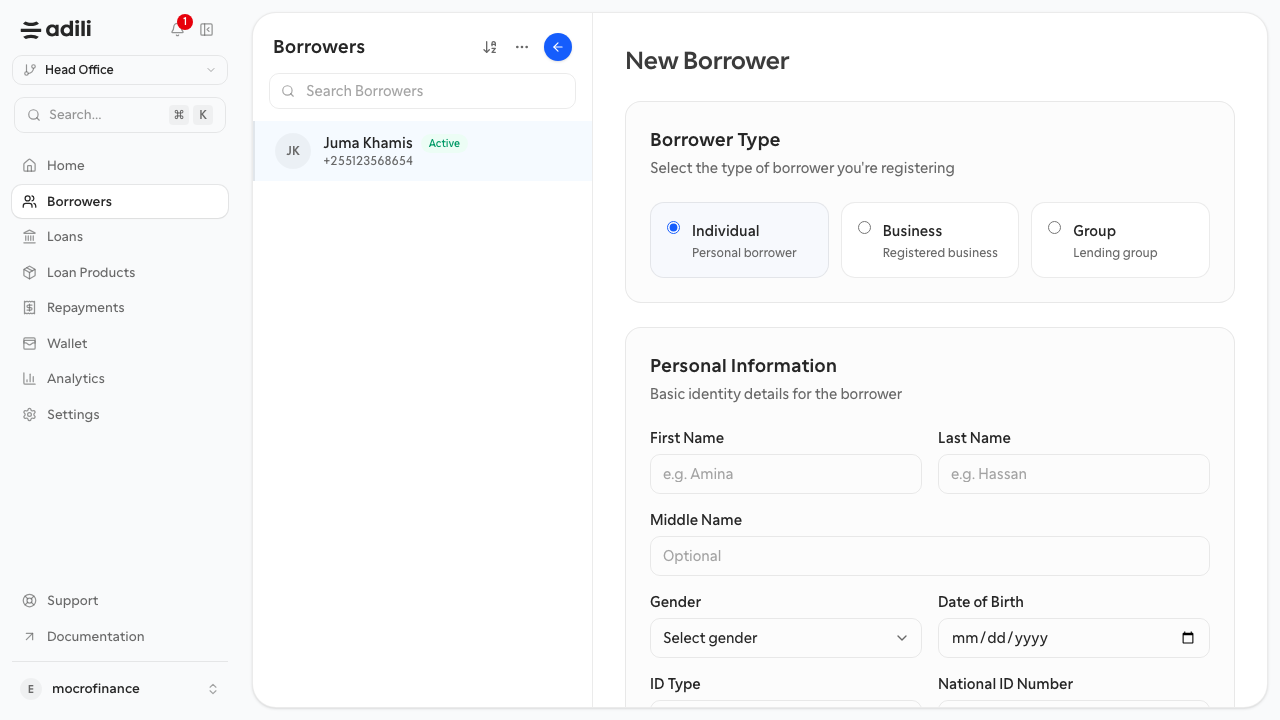
Purpose
Create one clean borrower record with enough information for underwriting, disbursement, and collections.
Role and prerequisites
- Recommended roles: branch manager, credit officer, operations officer
- You need the borrower's full name, phone number, and identity document details.
- Search the borrower list first to avoid duplicates.
Example values for practice
If you want sample values while rehearsing the form, use a simple borrower profile such as:
- First name:
Asha - Last name:
Suleiman - Gender:
Female - ID type:
NIDA - Phone:
+255712345678 - City:
Dar es Salaam - Occupation:
Retail shop owner - Monthly income:
1,200,000 TZS
Steps
- Open Borrowers and select Add borrower.
- Enter the borrower's legal name exactly as it appears on the identity document.
- Add the primary phone number and any other required contact details.
- Enter identity information such as document type and document number.
- Complete profile fields that your branch uses for assessment, such as occupation, business type, address, and income.
- Review the form for typing errors, especially the phone number and ID fields.
- Save the borrower.
Expected result
The new borrower opens in the borrower detail view and is immediately available in loan creation.
Troubleshooting
- If the save action is blocked, check for required fields with validation messages near the top or inside collapsed sections.
- If the phone number is rejected, standardize it to your branch format before saving.
- If a duplicate is discovered after save, stop and decide which record should remain authoritative before any loan is created.