
Disburse Loan
Complete disbursement details and move an approved loan into active servicing.
Disbursement should happen only after the loan is approved and the release details have been confirmed.
Purpose
The disbursement step records how the approved amount was released to the borrower and when servicing should begin.
Role and prerequisites
- Recommended roles: branch manager, finance officer, operations officer
- The loan must already be approved.
- Confirm the borrower, amount, and destination account or transfer method before release.
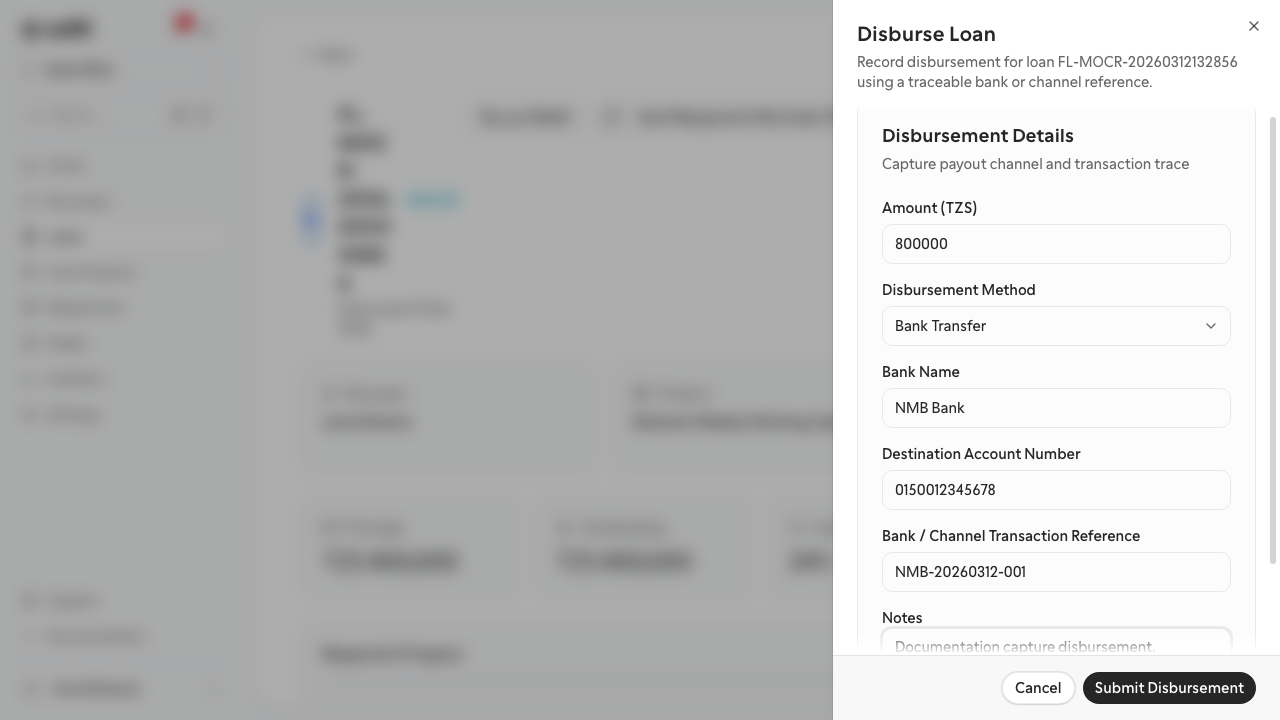
Tutorial data used in this documentation
- Bank:
NMB Bank - Account:
0150012345678 - Reference:
NMB-20260312-001
Steps
- Open the approved loan from the loans list.
- Select the action to disburse the loan.
- Confirm the disbursement amount and disbursement date.
- Enter the release method and payout details, such as bank name, account number, and transfer reference.
- Review the summary carefully.
- Confirm the disbursement.
Expected result
The loan moves into an active or disbursed state, and the disbursement is visible on the loan timeline or related activity area.
Troubleshooting
- If the disbursement action is unavailable, confirm the loan has completed approval.
- If payout details are incomplete, stop and correct them before confirming release.
- If the loan still shows as approved after disbursement, refresh the detail page and confirm the transaction was saved.