
Create Loan Product
Add a reusable loan product so loan officers can originate loans from approved branch rules.
Create a product before you create the first loan for a new lending offer.
Purpose
The product form stores the pricing and term defaults that staff should not have to re-enter for every loan.
Role and prerequisites
- Recommended roles: branch manager, credit manager, operations lead
- Confirm the approved pricing, term, and fee structure before saving the product.
- Check whether the product already exists under another name or code.
Tutorial data used in this documentation
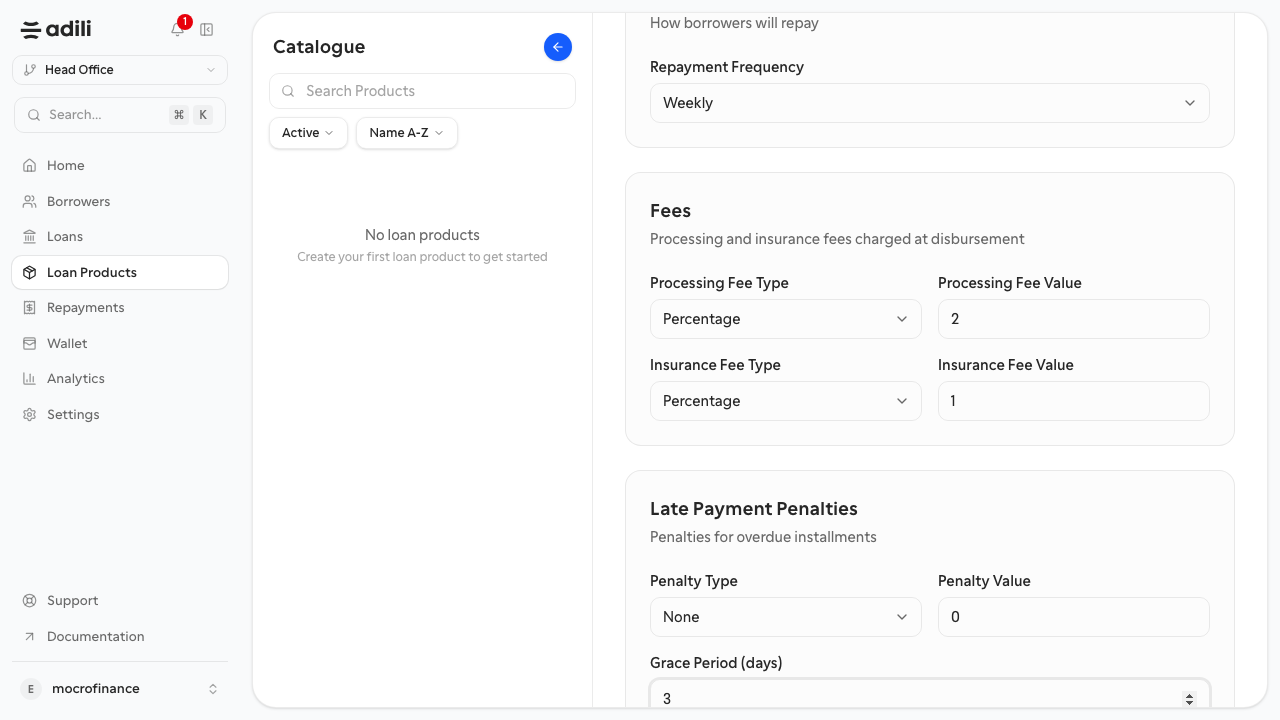
This docs set uses the following example product:
- Name:
Biashara Weekly Working Capital - Code:
BWCL-2603 - Interest:
24% per annum - Interest method:
Declining balance - Term range:
3-12 months - Default term:
6 months - Amount range:
200,000-3,000,000 TZS - Repayment cadence:
Weekly - Processing fee:
2% - Insurance fee:
1% - Grace period:
3 days
Steps
- Open Loan Products and select Create product.
- Enter the product name and internal code.
- Set the principal range, term range, and default term.
- Configure interest, fees, and any insurance or processing charges.
- Set the repayment cadence and grace-period rules.
- Review the summary carefully, because these defaults will flow into loan creation.
- Save the product.
Expected result
The product appears in the loan product list and can be selected when a new loan is created.
Troubleshooting
- If the product cannot be saved, check whether the code must be unique in your organization.
- If staff later see incorrect default terms or fees, return to the product and correct the source configuration.
- If two products are functionally identical, keep one standard product to avoid fragmented reporting.