
Record Repayment
Post a borrower payment to the correct active loan and payment reference.
Use this guide when cash, mobile money, or bank repayment has been received and needs to be recorded in the system.
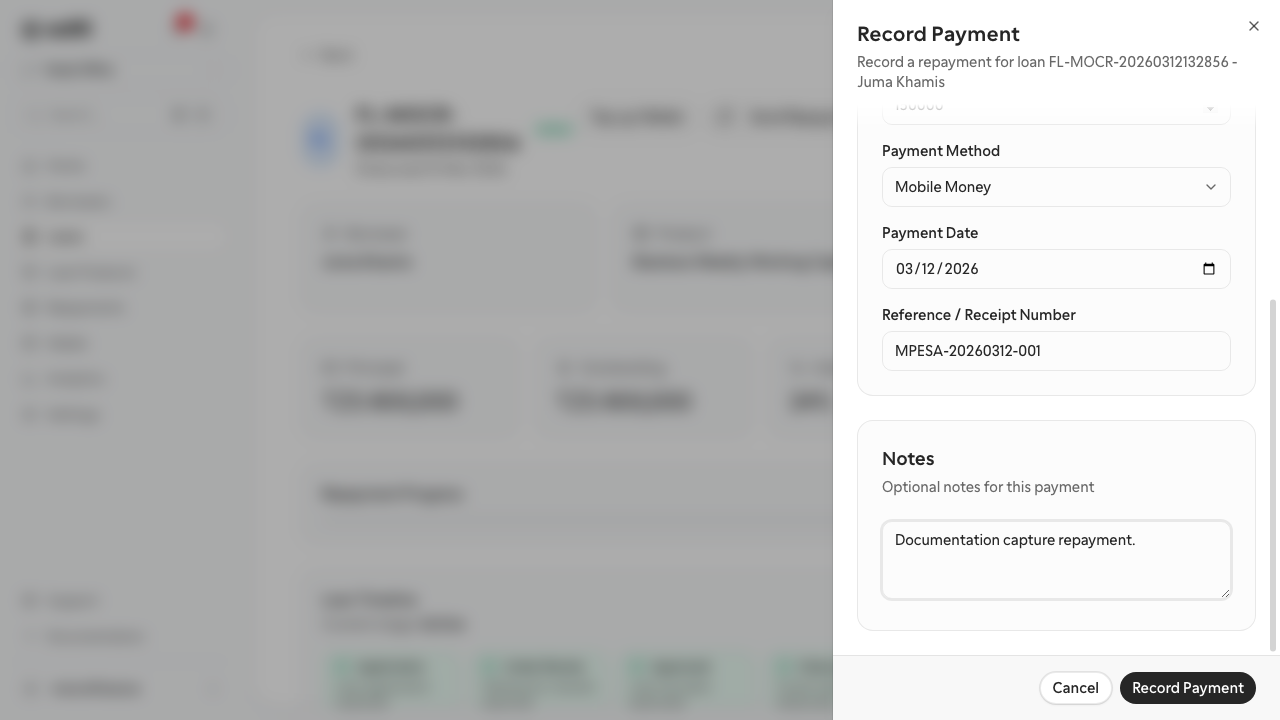
Purpose
The repayment form records the payment event that updates the loan activity and branch collections reporting.
Role and prerequisites
- Recommended roles: teller, collections officer, branch operations officer
- The target loan must already be disbursed or active.
- Confirm the amount, payment date, and payment reference before posting.
Tutorial data used in this documentation
- Amount:
150,000 TZS - Reference:
MPESA-20260312-001
Steps
- Open the active loan or the repayments area.
- Select the action to record a repayment.
- Confirm the borrower and loan reference.
- Enter the payment amount and payment date.
- Add the payment method and transaction reference.
- Review the details and save the repayment.
Expected result
The repayment appears in the loan activity and collections reporting, and the loan balance reflects the posted payment.
Troubleshooting
- If the repayment action is unavailable, confirm the loan has already been disbursed.
- If the balance does not look correct after posting, verify the payment amount and whether any earlier payments are missing.
- If a transaction reference was typed incorrectly, correct it as soon as possible to keep reconciliation clean.